A technical SEO audit is the foundation of any serious organic growth strategy. Without it, you are flying blind — building content and links on a foundation that may have hidden crawl, index, or rendering issues that prevent your pages from ever being seen by Google.
This guide is the definitive 2026 technical SEO audit checklist. It covers 120+ checks across 9 categories: crawlability, indexability, performance (Core Web Vitals), structured data, on-page, international, JavaScript, security, and log file analysis. Use it to audit any website — from a 10-page local business to a 1M-URL e-commerce platform.
How to use this checklist
The checklist is organized into 9 sections, each with specific checks, the tools to use, and the severity rating (Critical / High / Medium / Low). For a quick audit, focus on Critical and High items first. For a comprehensive audit, work through all 9 sections systematically.
Estimated audit time: 4–8 hours for a small site, 2–5 days for a large site. Use the table of contents to skip to specific sections.
Section 1: Crawlability (15 checks)
The first and most important section. If Google cannot crawl your site, nothing else matters.
1.1 robots.txt validation — [Critical]
Is robots.txt present at the root? (e.g., yoursite.com/robots.txt)Are there any Disallow: / rules blocking important pages?Is the sitemap declared in robots.txt?Are there any accidentally blocked directories (e.g., /blog, /products)?Tool: Screaming Frog, Sitebulb, or yoursite.com/robots.txt in browser1.2 XML sitemap validation — [Critical]
Is the sitemap present at /sitemap.xml or /sitemap_index.xml?Does it include all indexable pages?Does it exclude noindex, redirect, 404, and canonicalized-away pages?Is each URL's lastmod accurate?Are hreflang alternates declared?Tool: Screaming Frog, Google Search Console1.3 Internal link structure — [Critical]
Can Google reach every important page within 3 clicks from the homepage?Are there orphan pages (no internal links pointing to them)?Is link equity flowing to your most important pages?Are there excessive links per page (>100)?Tool: Screaming Frog (filter "Inlinks = 0"), Sitebulb1.4 Crawl budget waste — [High]
Are there faceted nav URLs being crawled unnecessarily?Are session IDs, filters, and sort parameters excluded from crawling?Are there low-value pages being crawled (e.g., internal search results)?Tool: Google Search Console → Settings → Crawl Stats1.5 Crawl errors — [Critical]
Are there 4xx, 5xx errors in the crawl?Are there redirect chains (3+ hops)?Are there redirect loops?Tool: Screaming Frog, Sitebulb, GSC → Pages1.6 URL parameters — [High]
Are URL parameters handled correctly (rel=canonical)?Are tracking parameters excluded from canonical URLs?Tool: GSC → URL Parameters (legacy), Screaming Frog1.7 Pagination handling — [Medium]
Are paginated series marked with rel="next" and rel="prev"? (Note: Google deprecated these in 2019 but still useful for some engines)Are paginated pages self-canonicalized?Tool: Screaming Frog1.8 Site architecture — [Critical]
Is the site architecture 3 clicks deep for all important pages?Are category pages above product pages in the hierarchy?Tool: Screaming Frog visualization, Sitebulb1.9 Staging/dev environment — [Critical]
Is the staging site noindexed?Is the staging site blocked in robots.txt for production?Are there any leaked staging URLs indexed?1.10 JS rendering crawl — [High]
Can Google render JavaScript and see the content?Are there resources that block rendering?Tool: GSC → URL Inspection → Rendered HTML, Mobile-Friendly Test1.11 Hreflang setup — [High] (for international sites)
Are hreflang tags correctly implemented?Are return tags present (hreflang cluster complete)?Is the x-default set?Tool: Screaming Frog, Merkle Hreflang Tester1.12 Pagination of paginated pages — [Low]
1.13 Pagination in faceted nav — [Medium]
1.14 Pagination in blog archives — [Low]
1.15 Pagination of product listings — [Medium]
Section 2: Indexability (15 checks)
If pages are crawled but not indexed, you have a problem.
2.1 Index coverage — [Critical]
How many pages are indexed (GSC)?Is the indexed count growing or shrinking?Are there indexed pages that should be noindex?Tool: GSC → Pages → Indexing2.2 Noindex tag issues — [Critical]
Are there important pages accidentally marked noindex?Are noindex tags correctly placed (in head, not body)?Tool: Screaming Frog (filter "Noindex")2.3 Canonical tag issues — [Critical]
Does every indexable page have a canonical tag?Is the canonical pointing to the correct URL?Are there conflicting canonicals (e.g., rel=canonical in HTML differs from HTTP header)?Tool: Screaming Frog2.4 Duplicate content — [High]
Are there significant duplicate content issues (e.g., www vs non-www, HTTP vs HTTPS, trailing slash variants)?Are these properly canonicalized?Tool: Copyscape, Siteliner, Screaming Frog2.5 Thin content — [High]
Are there pages with < 300 words that are indexed?Could these be noindexed, merged, or expanded?Tool: Screaming Frog (filter Word Count < 300)2.6 Soft 404s — [High]
Are there pages returning 200 but with "not found" content?Are these returning proper 404 or 410?Tool: GSC → Pages → Soft 404s, Screaming Frog2.7 Pagination handling (for indexation) — [Medium]
Is page 2+ of paginated series indexed properly?Are deep paginated pages excluded (e.g., rel=canonical to page 1)?2.8 Index bloat — [High]
Are there too many low-value pages indexed?Is the indexed-to-crawled ratio high (>0.8)?2.9 Faceted nav indexation — [High]
Are faceted nav URLs being indexed unnecessarily?Are they canonicalized to the main category page?2.10 Internal search indexation — [Critical]
Are internal search results blocked from indexing?2.11 Paginated archive pages — [Medium]
2.12 Staging URL indexation — [Critical]
2.13 AMP/canonical relationship — [Medium] (for AMP sites)
2.14 Pagination of comment pages — [Low]
2.15 Index coverage by section — [High]
Are there specific sections of the site that are over- or under-indexed?Tool: GSC → Pages → filter by sectionSection 3: Performance / Core Web Vitals (20 checks)
Google uses Core Web Vitals as a ranking signal since 2021. Performance is non-negotiable.
3.1 LCP (Largest Contentful Paint) < 2.5s — [Critical]
What's the 75th percentile LCP for mobile and desktop?Are images above-the-fold optimized?Is the server response time fast?Tool: PageSpeed Insights, Chrome UX Report, Search Console → Core Web Vitals3.2 INP (Interaction to Next Paint) < 200ms — [Critical] (replaced FID in 2024)
What's the 75th percentile INP?Are there long tasks blocking the main thread?Tool: PageSpeed Insights, Chrome UX Report3.3 CLS (Cumulative Layout Shift) < 0.1 — [Critical]
What's the 75th percentile CLS?Are images sized with width/height attributes?Are web fonts loaded with size-adjust or font-display: swap?Tool: PageSpeed Insights, Chrome UX Report3.4 Image optimization — [High]
Are images served in WebP or AVIF?Are images lazy-loaded below the fold?Are responsive images using srcset?Tool: PageSpeed Insights, Screaming Frog (filter images)3.5 JavaScript bundle size — [High]
Is the JS bundle size under 200KB (gzipped)?Is unused JS being shipped?Tool: Chrome DevTools Coverage, Bundlephobia3.6 CSS optimization — [Medium]
Is critical CSS inlined?Is non-critical CSS deferred?Tool: PageSpeed Insights, Chrome DevTools3.7 Font loading — [Medium]
Are fonts preloaded?Are fonts using font-display: swap?Is the number of font weights minimized?3.8 Server response time (TTFB) < 600ms — [High]
Is the TTFB fast?Is caching enabled?Is the CDN configured?Tool: PageSpeed Insights, GTmetrix3.9 Compression (gzip/Brotli) — [High]
Is gzip or Brotli enabled?Are HTML, CSS, JS, and SVG files compressed?3.10 HTTP/2 or HTTP/3 — [Medium]
Is the site using HTTP/2 or HTTP/3?Tool: Chrome DevTools Network tab3.11 Image dimensions — [High]
Are images served at the correct dimensions (not 4x larger than displayed)?Tool: PageSpeed Insights3.12 Third-party script impact — [High]
Are third-party scripts (analytics, ads, chat) blocking the main thread?Are they loaded async or deferred?Tool: Chrome DevTools Performance, PageSpeed Insights3.13 Render-blocking resources — [High]
Are there render-blocking CSS or JS files?Tool: PageSpeed Insights3.14 Preconnect/prefetch hints — [Medium]
Are preconnect/prefetch hints used for critical third-party origins?3.15 Mobile responsiveness — [Critical]
Is the site fully responsive?Are tap targets at least 48x48px?Is text readable without zooming?Tool: Mobile-Friendly Test, PageSpeed Insights3.16 Page weight — [High]
Is the total page weight under 1.6MB?Tool: PageSpeed Insights, GTmetrix3.17 Number of HTTP requests — [Medium]
Are there too many requests (>50)?Tool: GTmetrix3.18 Caching headers — [Medium]
Are static assets cached with long max-age?Are HTML responses cached appropriately?3.19 Image format — [High]
Are images using modern formats (WebP, AVIF)?Are PNGs replaced with SVG where possible?3.20 Critical rendering path — [High]
Is the critical rendering path optimized?Tool: PageSpeed Insights, Chrome DevToolsSection 4: Structured Data (15 checks)
Structured data helps Google understand your content and enables rich results.
4.1 Schema.org implementation — [Critical]
Is Schema.org markup implemented on the site?Is it in JSON-LD format (preferred)?Is it valid (passes Google's Rich Results Test)?Tool: Google Rich Results Test, Schema Markup Validator4.2 Organization schema — [High]
Is Organization schema on every page (or in the global layout)?4.3 BreadcrumbList schema — [High]
Is BreadcrumbList on all pages with breadcrumbs?4.4 Article/BlogPosting schema — [High]
Is article schema on all blog posts?Does it include author, datePublished, dateModified, image?4.5 Product schema — [Critical] (e-commerce)
Is Product schema on all product pages?Does it include price, availability, review, aggregateRating?4.6 LocalBusiness schema — [Critical] (local businesses)
Is LocalBusiness schema on the homepage?Does it include NAP (name, address, phone)?4.7 FAQ schema — [High]
Is FAQ schema on FAQ pages?Is it valid (max 10 questions per page)?4.8 HowTo schema — [Medium]
Is HowTo schema on tutorial content?4.9 Review/AggregateRating schema — [High]
Is AggregateRating on product/service pages?Are individual reviews structured?4.10 Event schema — [Medium]
Is Event schema on event pages?4.11 Recipe schema — [Medium]
Is Recipe schema on recipe pages?4.12 Video schema — [Medium]
Is Video schema on video pages?4.13 JobPosting schema — [Medium]
Is JobPosting schema on careers pages?4.14 Course schema — [Low]
Is Course schema on course pages?4.15 Person schema — [Medium]
Is Person schema on author pages?Section 5: On-Page SEO (15 checks)
5.1 Title tags — [Critical]
Is every page a unique title (50–60 chars)?Are target keywords near the beginning?Tool: Screaming Frog, MozBar5.2 Meta descriptions — [High]
Is every page a unique meta description (140–160 chars)?Does it include the target keyword naturally?5.3 H1 tags — [Critical]
Is there exactly one H1 per page?Does it include the target keyword?5.4 H2-H6 hierarchy — [High]
Is the heading hierarchy logical (H1 → H2 → H3, no skipping)?5.5 URL structure — [High]
Are URLs short, descriptive, and keyword-rich?Are dynamic parameters avoided?Is the URL structure consistent (no mixed conventions)?5.6 Image alt text — [High]
Do all images have descriptive alt text?Is keyword stuffing avoided in alt text?5.7 Internal linking — [Critical]
Are there contextual internal links to related pages?Is anchor text descriptive (not "click here")?Are orphan pages eliminated?5.8 Keyword in first 100 words — [Medium]
Is the target keyword in the first paragraph?5.9 Content length — [Medium]
Is the content long enough to be comprehensive (typically 600+ words for blog posts, 200+ for product pages)?5.10 Content uniqueness — [Critical]
Is the content unique (not copied from elsewhere)?5.11 Readability — [Medium]
Is the content scannable (subheadings, bullets, short paragraphs)?5.12 Multimedia — [Medium]
Does the content include images, videos, or other media?5.13 Content freshness — [Medium]
Is the content updated regularly?Is the datePublished / dateModified accurate?5.14 Outbound links — [Low]
Are there contextual outbound links to authoritative sources?5.15 Table of contents — [Low]
For long content, is there a TOC for navigation?Section 6: International SEO (10 checks)
For sites targeting multiple countries or languages.
6.1 Hreflang implementation — [Critical]
Are hreflang tags present and correct?Are return tags present?Tool: Merkle Hreflang Tester, Screaming Frog6.2 Hreflang in sitemap — [High] (alternative to HTML hreflang)
6.3 x-default — [High]
Is x-default set for the default page?6.4 URL structure for international — [Critical]
Is the URL structure chosen (ccTLD, subdirectory, subdomain)?Is it consistent?6.5 Content localization — [High]
Is content properly translated (not just auto-translated)?6.6 hreflang cluster completeness — [High]
Does every page in a cluster reference all other pages?6.7 hreflang + canonical consistency — [Critical]
Do hreflang and canonical point to consistent URLs?6.8 Server location — [Medium]
Is the server/CDN geographically appropriate?6.9 Language meta tag — [Medium]
Is the HTML lang attribute set correctly?6.10 Currency and units — [Medium]
Are currency, units, and formats appropriate per locale?Section 7: JavaScript SEO (10 checks)
For SPA / JS-heavy sites.
7.1 Rendering strategy — [Critical]
Is the rendering strategy (CSR, SSR, SSG, ISR) appropriate?Tool: Chrome UX Report, GSC7.2 JS errors in console — [High]
Are there JS errors when Google renders the page?Tool: Mobile-Friendly Test, GSC URL Inspection7.3 Critical content in JS — [Critical]
Is critical content available without JS?Does Google see the same content as users?7.4 Lazy-loaded content — [High]
Is lazy-loaded content indexable?7.5 Internal links in JS — [High]
Do internal links work without JS?Are they in <a href> tags (not onclick)?7.6 Meta tags in JS — [Critical]
Are meta tags (title, description) server-rendered or pre-rendered?7.7 Schema in JS — [High]
Is schema.org markup server-rendered?7.8 Sitemap includes JS URLs — [Medium]
7.9 JS bundle size — [High]
Is the JS bundle size manageable?7.10 Hybrid rendering — [Medium]
Is dynamic rendering used for crawlers if needed?Section 8: Security (5 checks)
8.1 HTTPS — [Critical]
Is the entire site on HTTPS?Are there mixed content warnings?Tool: SSL Labs, Chrome DevTools8.2 HSTS — [Medium]
Is HTTP Strict Transport Security enabled?8.3 Security headers — [Medium]
Are X-Frame-Options, X-Content-Type-Options, Content-Security-Policy set?8.4 Outdated software — [High]
Is the CMS, plugins, and server software up to date?8.5 Malware — [Critical]
Is the site free of malware?Tool: Google Search Console, SucuriSection 9: Log File Analysis (10 checks)
The deepest layer. Reading server logs shows exactly what Google crawls.
9.1 Crawl frequency by section — [High]
Which sections does Google crawl most?Are low-value pages being crawled more than high-value ones?9.2 Crawl by user agent — [High]
Googlebot, Googlebot-Image, Googlebot-Video, Mediapartners-GoogleAre there any suspicious user agents?9.3 Crawl by status code — [Critical]
How many 4xx, 5xx responses is Google getting?Are there patterns?9.4 Crawl by URL type — [Medium]
HTML, CSS, JS, image, PDF — which get the most crawl?9.5 Crawl timing patterns — [Medium]
When does Google crawl your site? (Peak hours, days)9.6 Crawl budget utilization — [High]
What % of your crawl budget is spent on low-value pages?9.7 Crawl redirect patterns — [Medium]
How much crawl budget is wasted on redirects?9.8 New URL discovery — [Medium]
How quickly does Google discover new URLs?9.9 Crawl of soft 404s — [High]
Is Google wasting crawl on soft 404s?9.10 Crawl of low-quality pages — [High]
Is Google crawling pages that should be noindex?Audit deliverables
A complete technical SEO audit should produce:
Executive summary — top 5 critical issues, business impact, recommended priorityDetailed findings — every check above with severity, evidence, and fixImplementation roadmap — what to fix in week 1, month 1, quarter 1Tracking dashboard — Looker Studio dashboard for ongoing monitoringRe-audit schedule — quarterly technical SEO re-audit cadenceTools for technical SEO auditing
Free:
Google Search ConsolePageSpeed InsightsMobile-Friendly TestRich Results TestGoogle Rich Results TestSchema Markup ValidatorBing Webmaster ToolsPaid (recommended):
Screaming Frog (USD 259/year) — the industry standardSitebulb (USD 49/month) — better visualizationAhrefs Webmaster Tools (free for verified sites)Semrush (USD 139/month)ContentKing (real-time auditing)OnCrawl (enterprise log analysis)Need help?
A complete technical SEO audit takes 4–8 hours for a small site, 2–5 days for a large site. If you do not have the time or expertise, contact me for a professional audit with prioritized fix roadmap.
For related content, see:
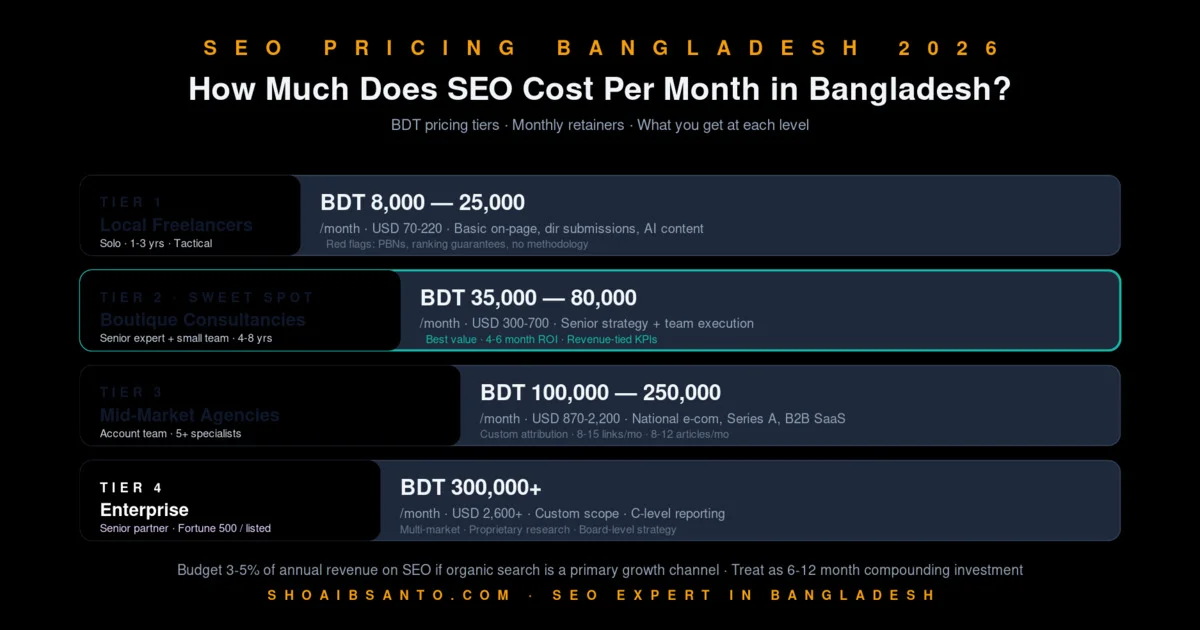
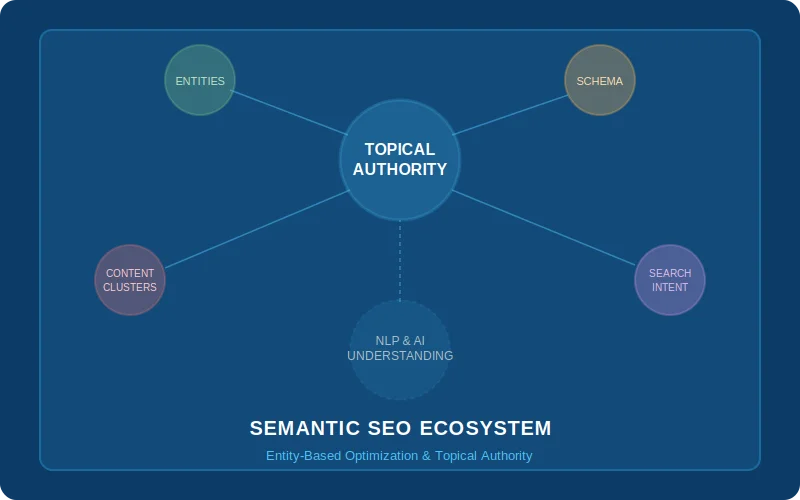
SEO services in Bangladesh 2026Semantic SEO: the future of search in 2026E-commerce SEO Bangladesh guide---
*Last updated: June 2026. By Shoaib Santo, with 8+ years of technical SEO experience across enterprise, SaaS, and SME clients.*